
Automated Freight Rate Sheet Generator
A custom web application that turns spreadsheet rate data, customer routes and pricing rules into branded, customer-ready rate sheets, with a person reviewing every case the rules can't settle.
A custom web application that turns spreadsheet rate data, customer routes and pricing rules into branded rate sheets, with a person reviewing every case the rules can't settle.
- Industry
- Freight forwarding and logistics
- Client
- Freight forwarder; identity confidential
- Built with
- Node.js, Google Cloud Run, Google Sheets and Drive
- About the demo
- A real client project, shown through a separate demo. Every company, customer and rate on this page is fictional.
A real client project for a freight forwarder, shown through a separate demo. Every company, customer and rate on this page is fictional.
The challenge and my role
A freight forwarder prepared customer rate sheets from recurring Excel rate workbooks, customer route lists and pricing rules spread across files. Each sheet had to bring together the available rates, the routes a customer needs, the container sizes or service required and that customer's commercial terms, and those inputs all change on different schedules.
I analyzed the workbooks and their pricing logic, structured the customer and route data, and built the application end to end: matching and pricing services, browser workflows, Google Workspace integrations, PDF output and cloud deployment.
Rate sheets were built from Excel rate workbooks, customer route lists and pricing rules across files, all changing on different schedules. I analyzed the logic, structured the data and built the application end to end.
Locations
Names aren't direct matches
Ports have aliases and destinations can depend on routing rules, so a simple lookup can return a plausible but wrong lane.
Ports have aliases; destinations can depend on routing rules.
Equipment
One lane, several container sizes
A lane can suit one container size and not another. Smaller shipments are priced per cubic meter with minimum volumes.
A lane can suit one size and not another.
Exceptions
Some decisions need a person
Spot offers need review, and a rate refresh must never undo a deliberate manual choice or a saved pricing exception.
A rate refresh must never undo a manual choice.
WalkthroughWalkthrough · 2:42
See one customer's rate sheet come together
Customer routes, carrier-rate matching and a pricing exception, followed through to a finished PDF. Recorded in the separate demo with email delivery turned off.
- 0:00Project and finished output
- 0:16Source data and requirements
- 0:32Customer routes and matching
- 0:57Route pricing exception
- 1:23Customer document preview
- 1:43PDF generation and saved output
- 2:08Reviewing previous output
- 2:21Architecture and contribution
8 chapters
- 0:00Project and finished output
- 0:16Source data and requirements
- 0:32Customer routes and matching
- 0:57Route pricing exception
- 1:23Customer document preview
- 1:43PDF generation and saved output
- 2:08Reviewing previous output
- 2:21Architecture and contribution
Transcript
0:00
Project and finished output.
Regassa Automations built this application for a freight forwarder. It turns customer routes, carrier rates and pricing rules into branded rate sheets like this one. This is a separate demo, so every company, customer and price you'll see is fictional.
0:16
Source data and requirements.
The data lived in separate spreadsheets: customer routes, carrier rates that change every cycle, and pricing rules. The same lane can be written differently in each, so a correct quote needs service, routing, equipment and customer terms to agree.
0:32
Customer routes and matching.
Each customer keeps a saved route list. Full container loads, or FCL, are quoted by container size, so the requested sizes stay together. Less than container loads, or LCL, share a container and are priced per cubic meter. The matching engine uses explicit location and routing rules to find the right carrier lane, shows why it chose it, and keeps any lane an operator picked by hand.
0:57
Route pricing exception.
Matching and pricing are separate decisions. This route follows the customer's standard pricing. Here, the operator adds seven dollars and fifty cents per cubic meter on top of it. The server calculates the new price before anything is saved, and the exception stays with this route when its carrier match is refreshed.
1:23
Customer document preview.
In the generator, the operator sets the validity dates and selects the customer. The preview assembles the routes, calculated prices, minimum volumes, notes and terms, including the exception just saved. Nothing has been created yet; this is a review step. Email delivery is switched off in this demo.
1:43
PDF generation and saved output.
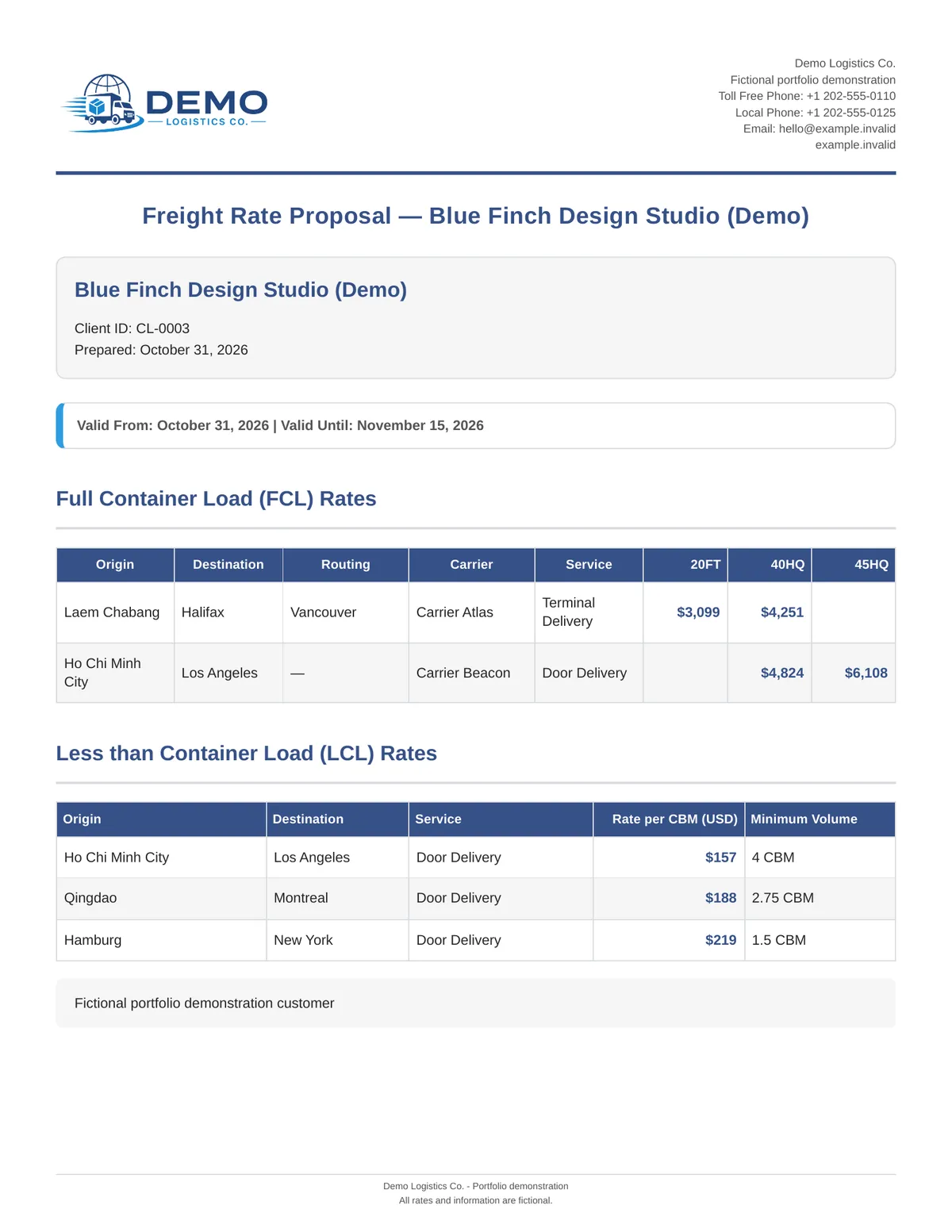
Generating uses the same pricing as the preview and saves the PDF to Google Drive. The screen shows each stage and reports the result. Here is the saved document, with the adjusted LCL rate and the customer's notes and terms. The internal reason for the price change stays out of the customer's copy.
2:08
Reviewing previous output.
Every run is saved. An operator can return to a previous batch, check its files and open the PDF without regenerating anything, so there is a record of what was produced for each customer.
2:21
Architecture and contribution.
Regassa Automations designed the data model, the matching and pricing logic, the Google Workspace integration, the web application and the cloud deployment. If your business runs on spreadsheets, customer-specific rules and recurring documents, let's talk about building a workflow like this for yours.
One route, start to finish
How a single customer route becomes a priced line on a rate sheet. The route shown is taken from the sample rate sheet.
A route from the sample rate sheet, followed through the application.
1 · Request
The customer needs a route
- From
- Laem Chabang
- To
- Halifax
- Service
- Terminal
- Sizes
- 20FT, 40HQ
- Route
- Laem Chabang to Halifax
- Sizes
- 20FT, 40HQ
Saved once on the customer's route list and reused every cycle.
2 · Match
A source lane is chosen
- Routing
- Via Vancouver
- Carrier
- Carrier Atlas
- Reason
- Recorded
- Routing
- Via Vancouver
- Carrier
- Carrier Atlas
Rules handle aliases, routing and container fit. The choice is stored with its explanation.
No clear match? It stops with a reason for a person to decide.
3 · Price
Customer terms are applied
- Profile
- Customer pricing
- Exception
- If one is saved
- Calculated by
- Server
A saved route exception stays with the route through future rate refreshes.
Pricing profile plus any saved route exception, calculated on the server.
4 · Document
It lands on the rate sheet
- 20FT
- $3,099
- 40HQ
- $4,251
- 45HQ
- Not requested
- 20FT
- $3,099
- 40HQ
- $4,251
Previewed first, then rendered to PDF and saved to Drive.
When no lane fits, a person decides
At step 2, a route with no suitable or no clear match is never priced from a guess. It shows the reason, and the operator can choose a lane manually. That choice is protected from later automatic rematches.
The application
Operators work in dedicated workspaces for clients, routes, rate sheet generation, notes and audit history. Each customer's source rates, pricing and document content are assigned separately, so changing one never quietly changes another.
A route can follow the customer's standard pricing, add an adjustment on top, or use its own formula on the matched rate. Previews and PDFs use the same server calculation, so what the operator reviews is what the customer receives.
Workspaces for clients, routes, generation, notes and audit history. Previews and PDFs share one calculation, so what's reviewed is what's sent.
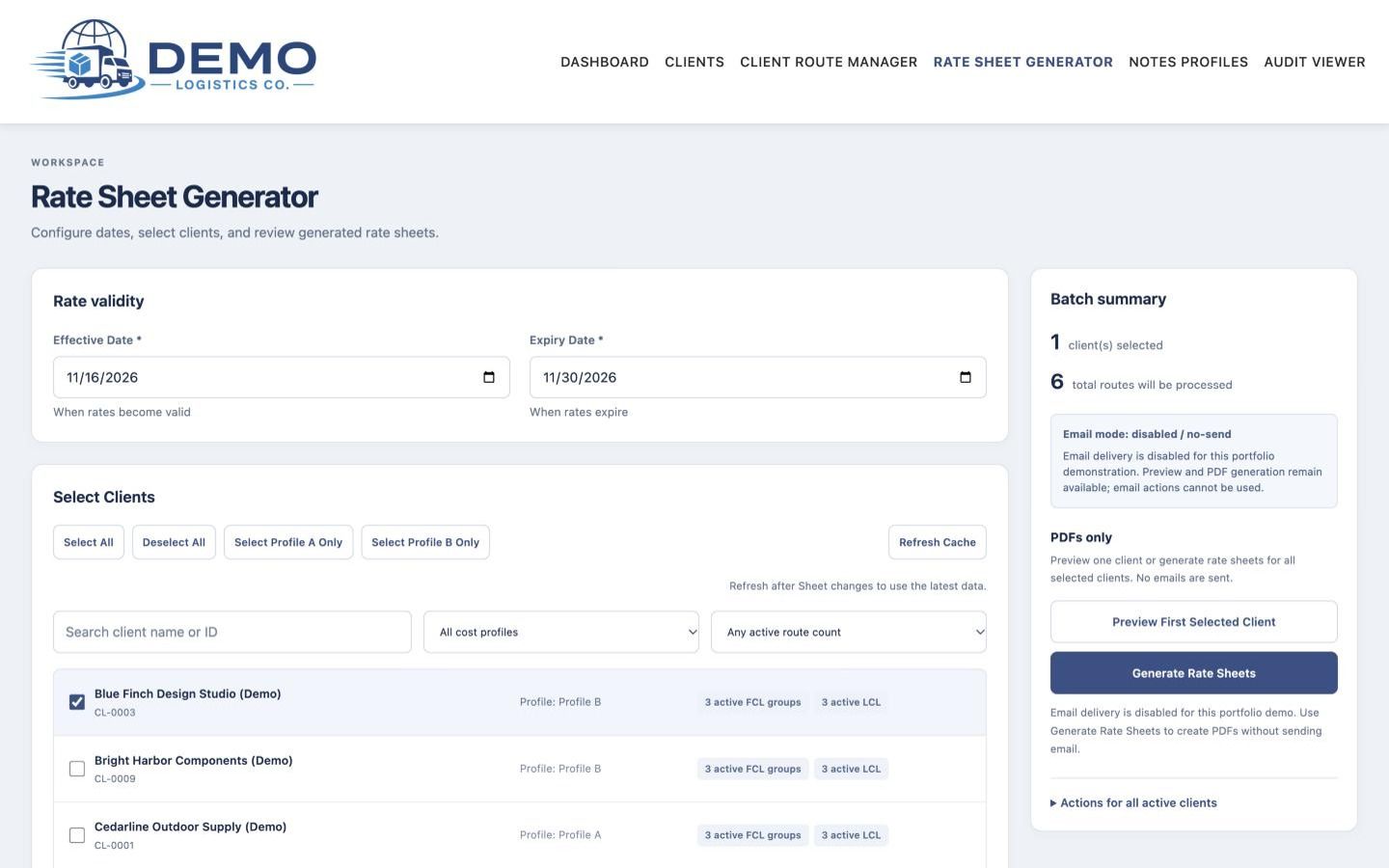
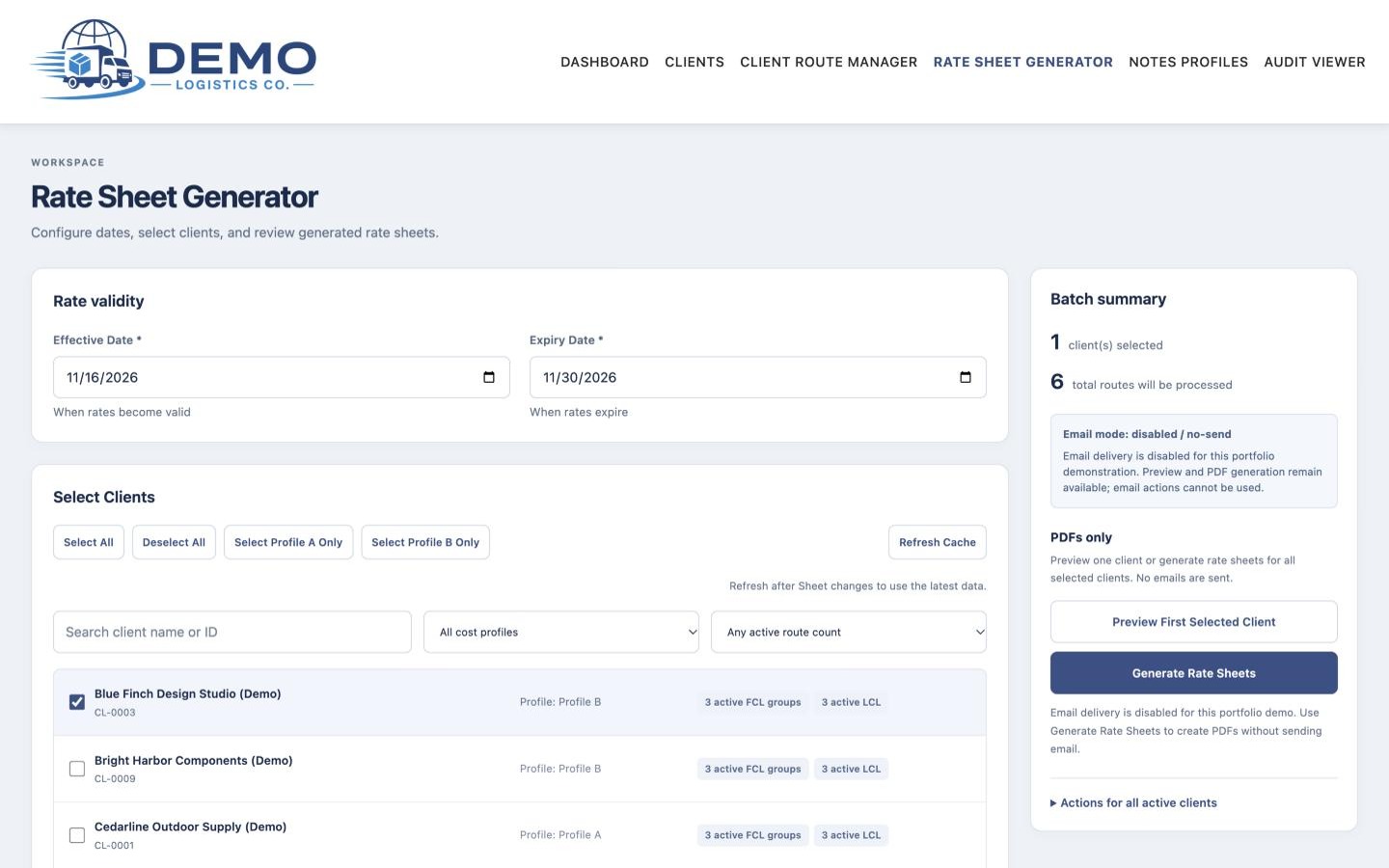
Rate sheet generator
Set validity dates, choose customers and generate PDFs. Email delivery is turned off in the demo.
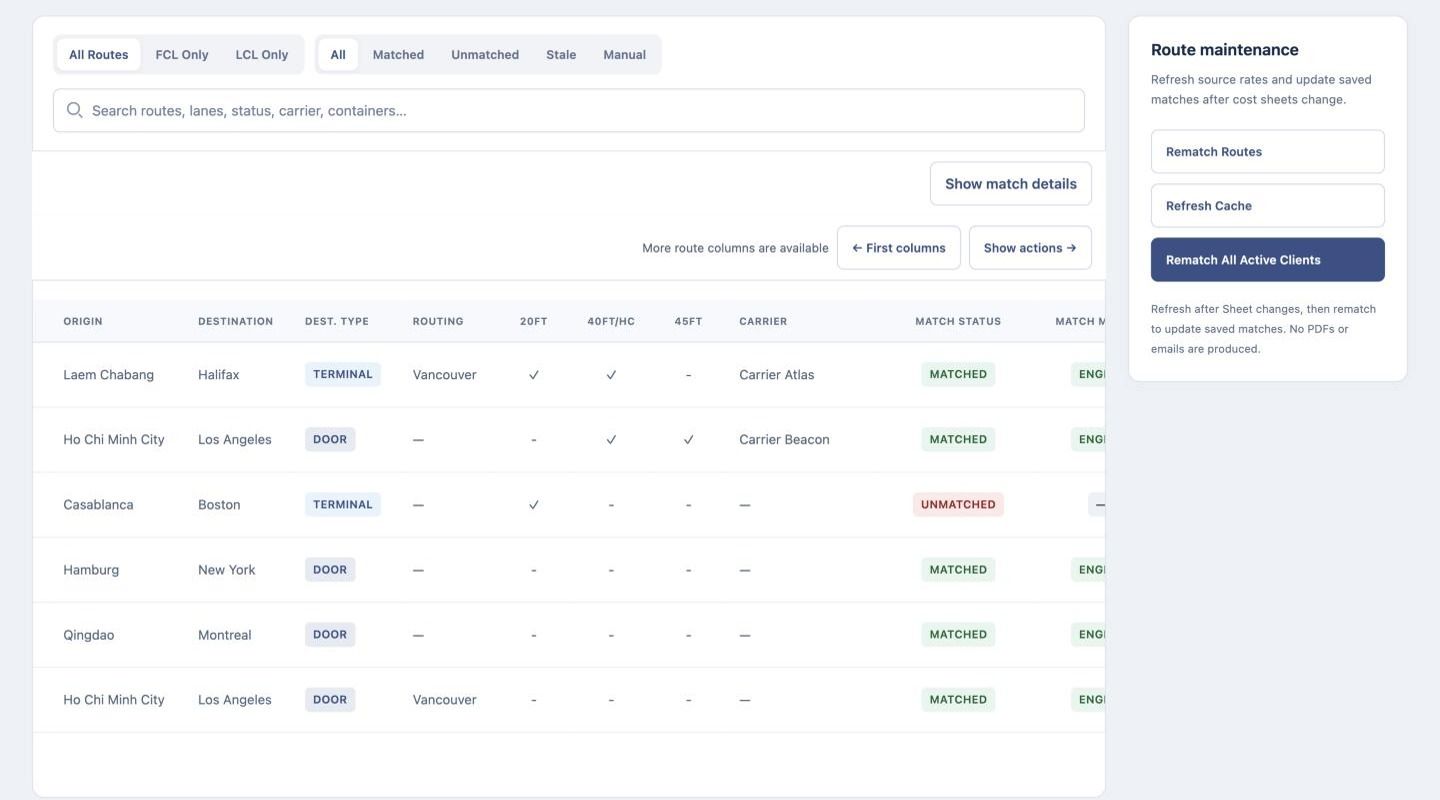
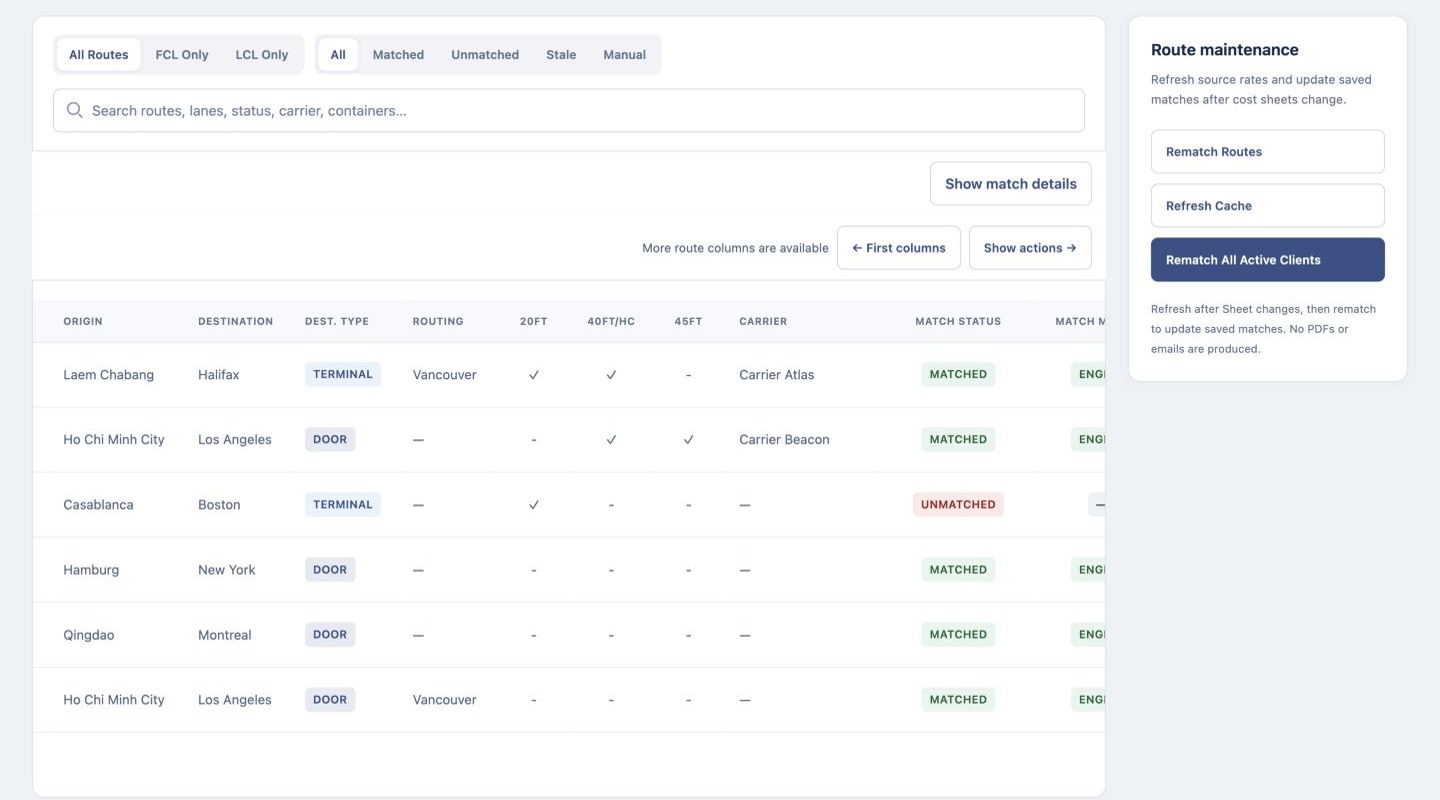
Customer routes and match status
Every route shows whether it matched a source lane. The unmatched route waits for a person to decide.
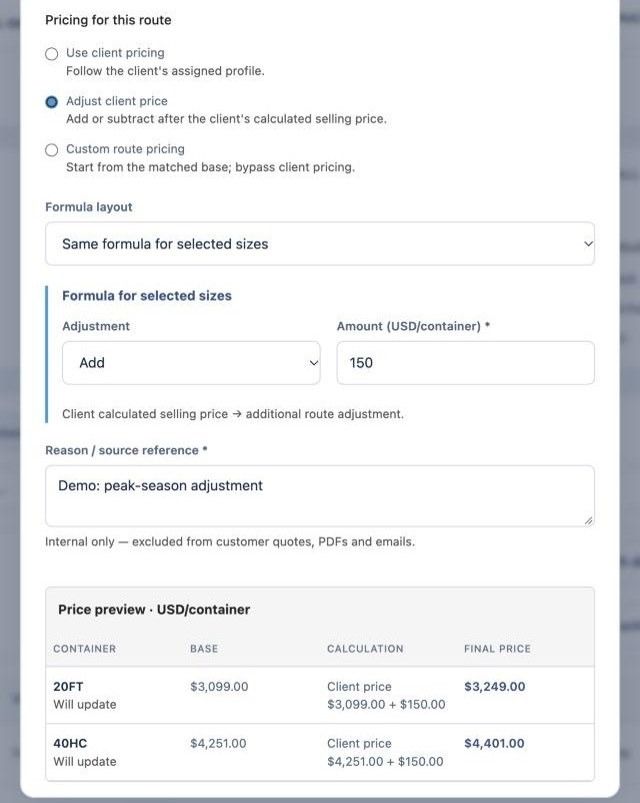
Route pricing exception
The Laem Chabang to Halifax route from the sample sheet with a $150 adjustment, calculated by the server before anything is saved.
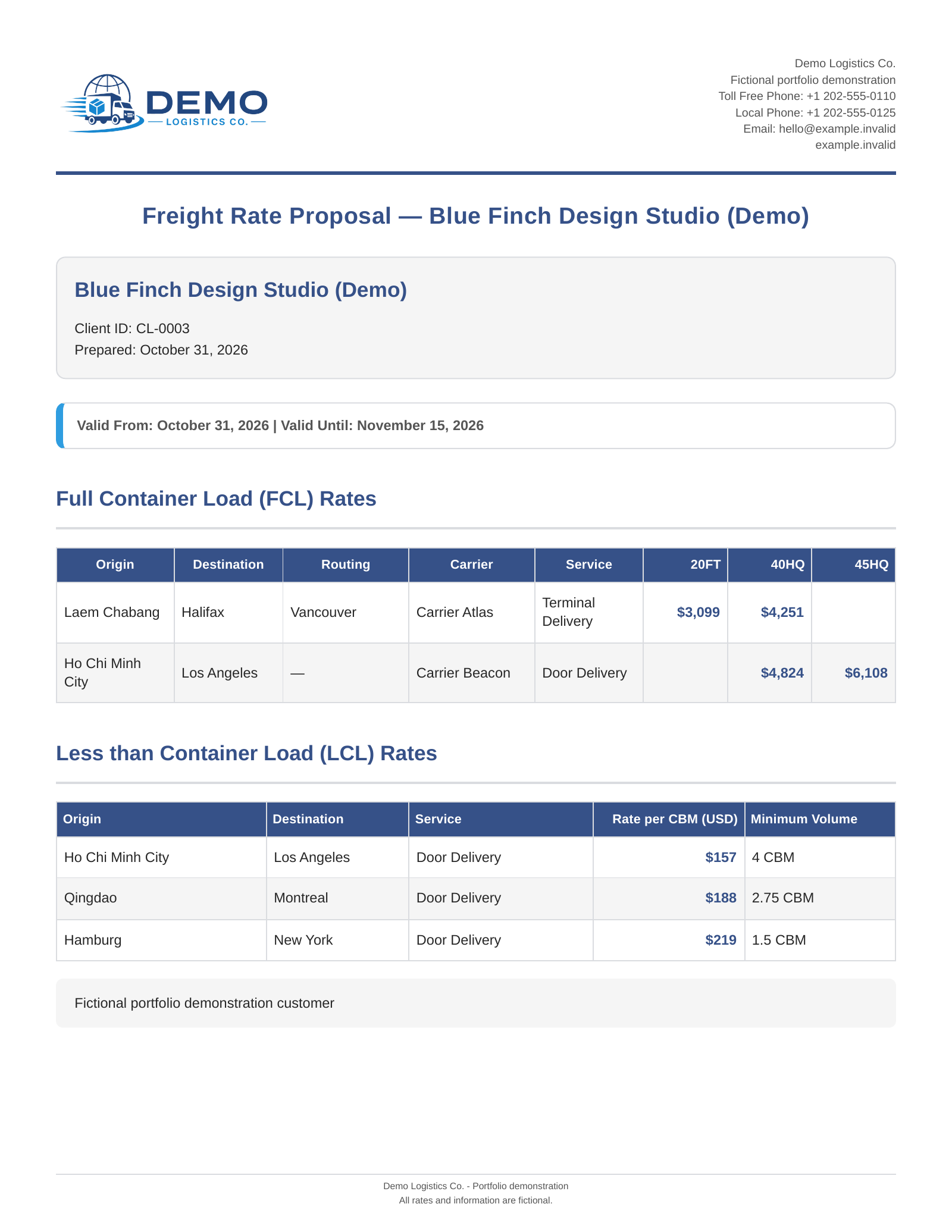
Finished rate sheet
Validity dates, container prices by size and per-cubic-meter rates with minimum volumes.
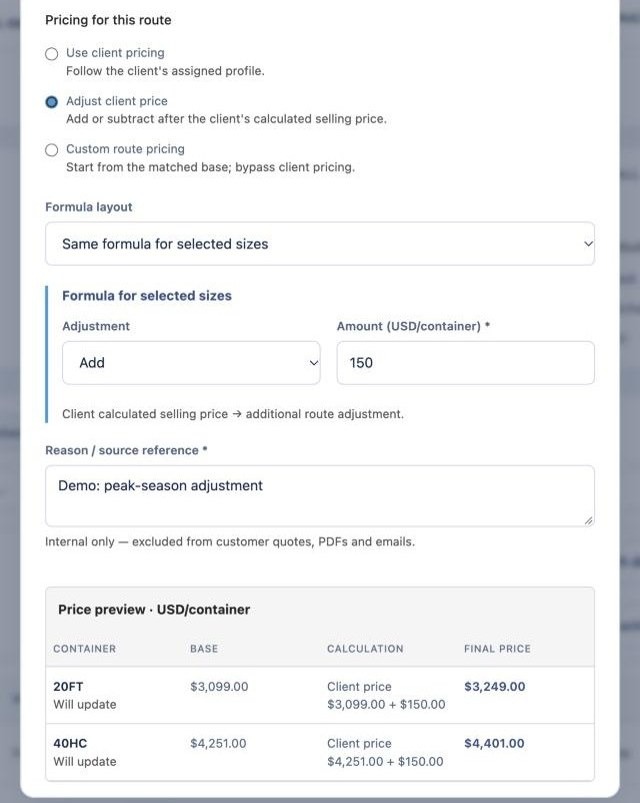
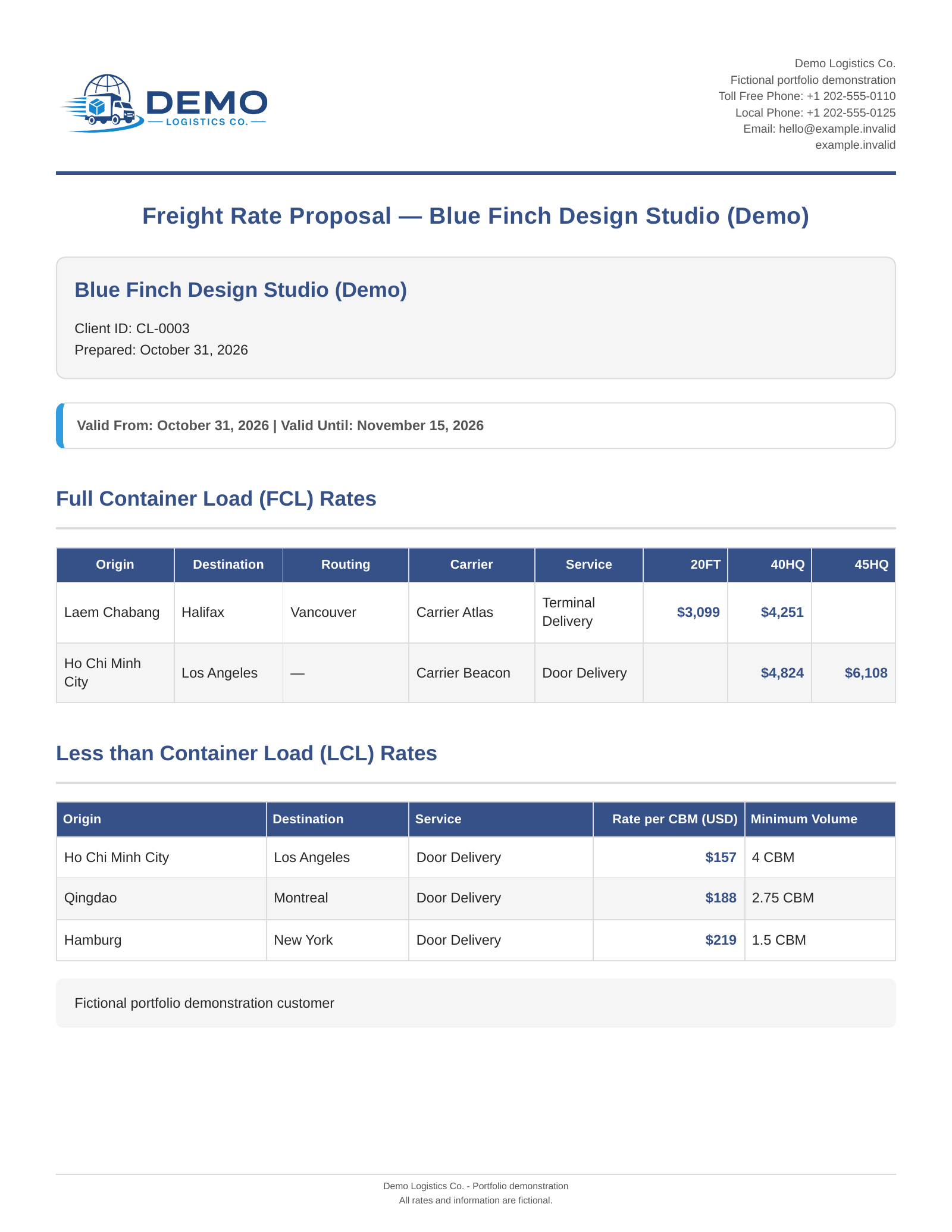
Route pricing exception. Previewed by the server before saving. 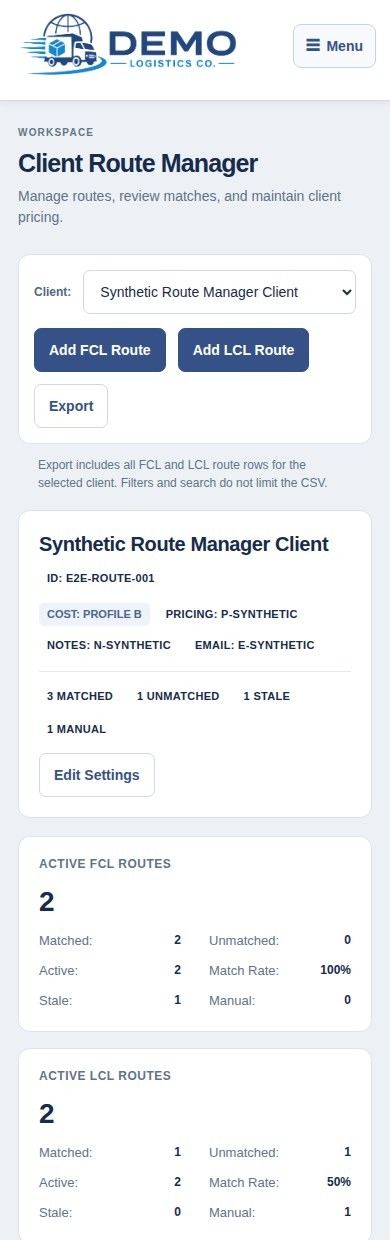
Client Route Manager on a phone. Match status for every route. Rate sheet generator. Dates, customers and PDFs in one place.
How a rate cycle runs
From new source rates to saved customer documents.
Refresh and rematch
Load new source rates and rematch the relevant customer routes.
Load new rates, rematch routes.
Review exceptions
Resolve unmatched or ambiguous routes; manual choices are kept.
Resolve unmatched routes.
Apply pricing
Customer terms and saved route exceptions.
Customer terms and exceptions.
Set dates and preview
A read-only preview of each document. Nothing is saved or sent yet.
Nothing saved or sent yet.
Generate PDFs
Batch generation with progress and an outcome report.
With a batch outcome report.
Review saved output
Earlier batches stay available in Drive and in the app.
Past batches stay available.
What changed
| Area | Before | With the application |
|---|---|---|
| Customer routes | Routes and preferences in workbook tabs | Saved route records with assigned profiles |
| Rate interpretation | Rate workbooks plus separate reference data | Rule-based matching with an explanation for every result |
| Pricing | Workbook formulas and one-off adjustments | Shared pricing profiles and route exceptions that persist |
| Exceptions | Interpreted case by case | Flagged with a reason; manual choices are protected |
| Documents | Assembled into the final sheet | Preview, PDF generation and a searchable archive |
Pricing
Before: workbook formulas and one-off adjustments
Now: shared profiles and exceptions that persist
Exceptions
Before: interpreted case by case
Now: flagged with a reason; manual choices protected
Documents
Before: assembled into the final sheet
Now: preview, PDF generation and an archive
What the operator gets
- The same price in the preview and the PDF
- Customer exceptions that survive rate refreshes
- A clear list of routes that need a decision
- Every past rate sheet, one click away
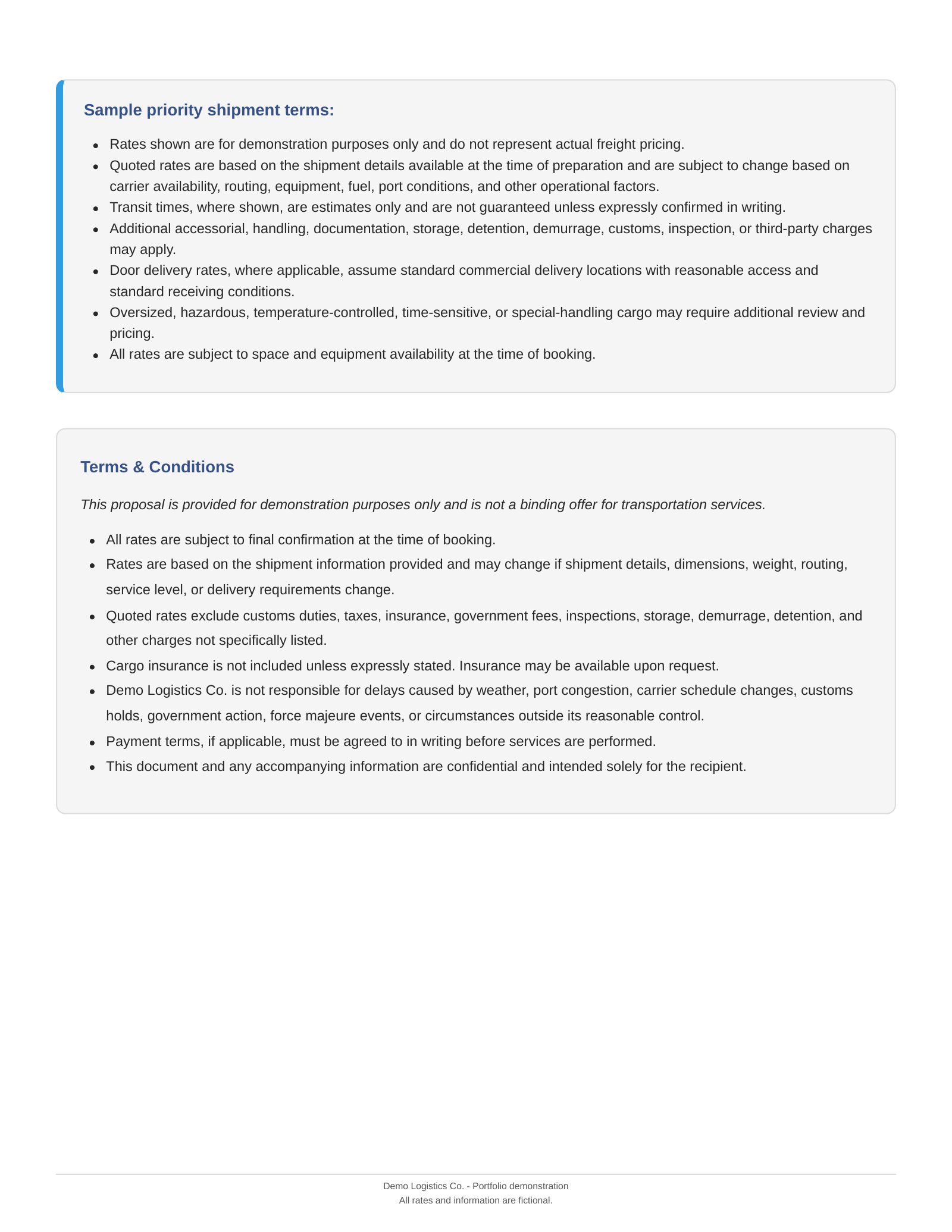
Sample rate sheet
Two pages: rates for both shipment types, notes and terms.Two pages · PDF, 664 KB
Download PDF (664 KB)These are delivered capabilities, verified in controlled demo runs and automated tests. Time savings would need to be measured in routine use, so none are claimed here.
Verified in demo runs and automated tests. No time savings are claimed until measured in routine use.
The same pattern, other industries
The hard part was never freight. It was spreadsheet data, customer-specific rules and a recurring document that has to be right every time. That combination turns up in many businesses.
Spreadsheet data, customer-specific rules and a recurring document that has to be right every time.
Accounting firmsAccounting
Client reports and engagement letters
Figures from practice software and spreadsheets turned into the same monthly report for every client.
Insurance agenciesInsurance
Renewal and quote summaries
Carrier quotes and client details assembled once into a clear proposal, instead of re-keyed three times.
Law firms
Engagement letters and fee estimates
Intake details, matter type and billing rules assembled into consistent letters and estimates.
Distribution
Customer price lists
A master catalog plus account-specific discounts, issued as a branded list each season.
Agencies and consultanciesAgencies
Proposals and statements of work
Standard rates and client terms combined into proposals that match every time.
Trades and manufacturingTrades
Quotes from cost sheets
Material and labor costs, markups by customer type and a quote that's ready to send.
Technical detail
- JavaScript
- Node.js
- Express
- Google Cloud Run
- Sheets and Drive APIs
- Google Docs
- Puppeteer
- Chromium
- Cloud Run
Engineering decisions that mattered
Matching kept apart from pricing. Choosing a source lane is a different decision from a customer's commercial terms, so saved pricing instructions survive a rematch.
One calculation for preview and PDF. The browser sends pricing instructions, never a final price; the server calculates both outputs.
Grouped edits saved together. One container route can span several equipment rows. Changes are validated and written together, and an uncertain save is checked rather than resent.
A worked pricing example
In a controlled demo run, these route exceptions were saved, reopened, kept through a rematch and matched in both preview and PDF. Resetting them restored the inherited prices. Demonstration values only.
| Service | Inherited | Change | Result |
|---|---|---|---|
| FCL 20FT | $2,350 | +$125 | $2,475 |
| FCL 40HC | $3,270 | +$175 | $3,445 |
| FCL 45FT | $4,140 | +$225 | $4,365 |
| LCL Door, per CBM | $135.00 | +$7.50 | $142.50 |
Matching
The engine normalizes origin, destination and routing using configured aliases, equivalences and coverage rules. Full container load (FCL) evaluation considers the eligible source pool, equipment viability and carrier preferences; less than container load (LCL) has separate matching and fallback behavior. Matching and pricing are deterministic, rule-based logic.
Pricing modes
Customer profiles supply shared defaults. A route can use them, adjust the customer result, or apply a replacement formula to the matched base. FCL exceptions can target selected container sizes; LCL uses a price per cubic meter. Spot and unavailable values keep their special handling instead of becoming zero-dollar quotes.
Saving and recovery
The browser sends pricing instructions, equipment scope, a configuration version and a server preview fingerprint. Route changes, pricing instructions and the committed operation result are written together within one workbook. An operation ID supports status checks, so a retried save never becomes a second change.
Integration and access
The demo is separated from client resources and uses fictional data. Startup checks require an explicit resource allowlist and disabled outbound email. Identity-Aware Proxy and IAM provide the access boundary, and saved PDFs are served through application endpoints that check the configured output folder.
Engineering decisions
Matching is kept apart from pricing, so exceptions survive rematches. Preview and PDF share one server calculation. Grouped route edits are saved together, and uncertain saves are checked rather than resent.
A worked pricing example
Demo route exceptions: FCL 20FT $2,350 to $2,475; 40HC $3,270 to $3,445; 45FT $4,140 to $4,365; LCL $135.00 to $142.50 per CBM. Saved, kept through a rematch, matched in preview and PDF.
Matching and pricing
Aliases, equivalences and coverage rules normalize each route. Profiles supply defaults; routes can adjust or replace them. Spot and unavailable values never become zero-dollar quotes. Deterministic, rule-based logic.
Architecture and access
A Node.js app on Cloud Run reads and writes Google Sheets, stores PDFs in Drive and reads notes from Docs. The demo is isolated from client resources, email is disabled, and access runs through Identity-Aware Proxy and IAM.
Have a workflow that needs to work together?
Tell me where information enters your process, which rules need to apply, and what your team needs at the end. We can discuss an automation that fits the way your business operates.
Tell me where information enters your process, which rules apply, and what your team needs at the end.
See other case studies